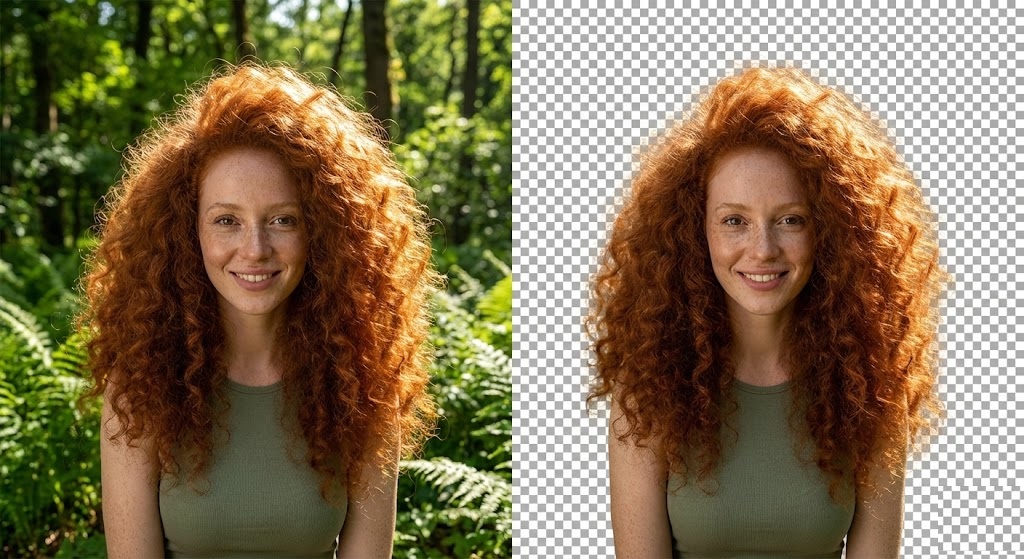
The “Hair Nightmare” in Graphic Design
Ask any graphic designer what their worst nightmare is, and they will likely say the same thing: “Cutting out hair.”
For decades, separating complex objects like curly hair, fur, or wispy flyaways from a background was a torture test. You had to use the “Pen Tool” in Photoshop to manually trace around the head, resulting in a “helmet hair” look that was obviously fake. Or, you had to spend hours refining “Channel Masks” to capture the semi-transparent pixels.
If you have ever tried to remove a background and ended up deleting half of the subject’s hair, you know the struggle. But in 2026, you don’t need manual tools. You can remove background from hair instantly with rmvbg.net.
Why Is Hair So Difficult?
Hair is technically challenging because it isn’t solid. It has:
- Transparency: Light passes through thin strands, picking up the color of the background.
- Micro-Details: A single photo can have thousands of individual hairs that are only 1-2 pixels wide.
- Color Contamination: If a blonde person stands against a green wall, their hair often looks slightly green (color bleed).
Standard background removers use “hard” masking, which chops off these details. Our AI uses Alpha Matting (soft masking) to preserve them.
The “Magic Wand” vs. AI
Let’s compare the old way with the new way.
- Magic Wand (Old)
- Selects by color similarity.
- Jagged edges. Hair looks like a plastic helmet.
- Pen Tool (Manual)
- Drawing paths by hand.
- Unnatural. Cannot capture individual strands.
- rmvbg.net (AI)
- Deep Learning / Semantic Segmentation.
- Photorealistic. Preserves transparency and curls.
| Tool | Method | Result |
|---|
Step-by-Step: Perfect Curls in Seconds
Whether you are editing a fashion shoot, a pet portrait, or a family photo, the process is the same.
Step 1: Upload a High-Res Photo
Hair detail requires resolution. The better your source file, the better the cutout. Upload your JPG or PNG to rmvbg.net.
Step 2: AI Analysis
Our neural network identifies the “Subject” (Human) and separates it from the “Background.” It then performs a second pass specifically for edges. It looks for the transition pixels where the hair fades into the background.
Step 3: The Result
Download the transparent PNG. When you place this over a new background (try a dark color to test it), you will see that the light still passes through the gaps in the curls. This creates a natural, blended look that mimics how a camera lens actually works.
Pro Tip: Dealing with “Color Bleed”
Sometimes, even with a perfect cutout, the hair might still have a tint from the old background (e.g., green tint from grass).
The Fix: In your design software (Canva/Photoshop), add a “Hue/Saturation” adjustment layer clipped to the hair. Slightly desaturate the offending color. Because our cutout preserves the transparency, this correction blends seamlessly.
Who Needs This Tool?
- Fashion Retailers: showcasing hats, scarves, or earrings where model hair is prominent.
- Pet Photographers: Fur is just as hard as hair! We handle fluffy cats and dogs with ease.
- Portrait Retouchers: Speed up your workflow by 90% by automating the masking process.
Conclusion
Stop settling for “helmet hair.” Stop spending hours painting masks in Photoshop.
Use rmvbg.net to handle the hardest part of your job. Our specialized algorithms are trained to remove background from hair with surgical precision, giving you professional results for free. Upload your trickiest photo today and see the difference.