We Eat With Our Eyes First
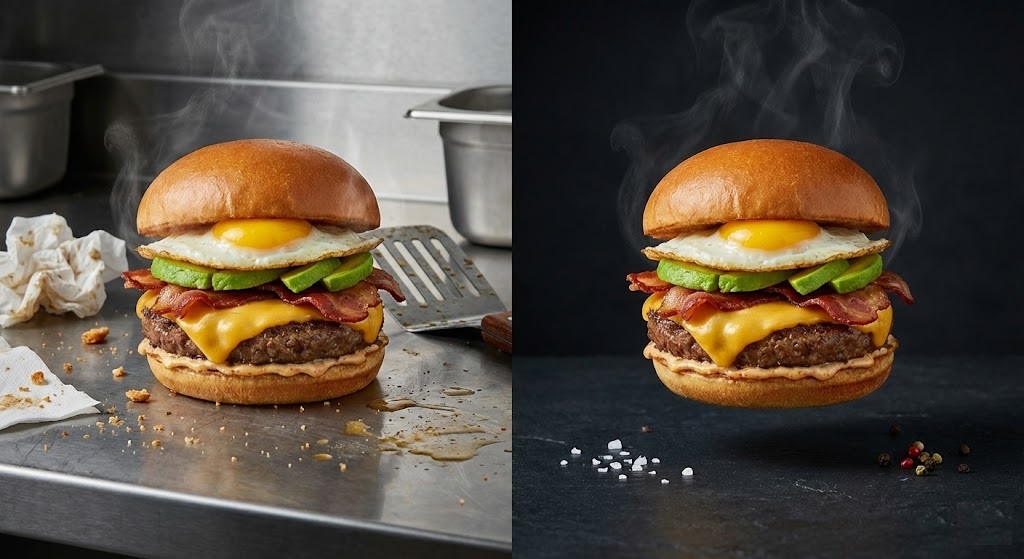
You have the best burger in town. But on your UberEats or DoorDash listing, the photo shows the burger sitting on a greasy stainless steel counter with a blurry chef in the background.
In the world of online food delivery, your photo is the menu. A customer scrolling through hundreds of options will pick the dish that looks the most appetizing. A cluttered, amateur photo kills the appetite. A clean, professional photo stimulates it.
You don’t need a food stylist or a lightbox. You can transform your quick kitchen snapshots into Michelin-star quality menu items using a food photography background remover like rmvbg.net.
Why “Context” Can Hurt Food Sales
While “lifestyle” shots are great for Instagram, they are terrible for conversion on delivery apps.
- Distraction: A busy tablecloth or a dirty napkin takes attention away from the food.
- Scale: If you include a fork or a drink in the shot, it can make the portion size look smaller than it is.
- Consistency: If your menu has one photo on a wood table, one on a white plate, and one on a metal counter, your brand looks disorganized.
The industry standard for digital menus is a consistent, clean background (usually white, black, or a branded color) that makes the food pop.
The UberEats / DoorDash Standard
These platforms actually prioritize items with specific photo criteria.
DoorDash recommends: “Items should be centered. Use natural lighting. Avoid busy backgrounds.”
UberEats often rejects photos that are too dark or cluttered.
By removing the background completely, you guarantee that your image meets the guidelines of every delivery platform instantly.
Step-by-Step: From Kitchen to Customer
Here is how to digitize your menu for free.
Step 1: The Plate Shot
Place your dish on a neutral plate. Wipe the rim of the plate (fingerprints look bad!). Take the photo from a 45-degree angle (best for burgers/sandwiches) or top-down (best for pizza/bowls).
Lighting Tip: Shoot near a window. Never use the camera flash—it makes food look greasy.
Step 2: The Cleanup
Upload your photo to rmvbg.net. Our AI is trained to recognize food textures—the fluffiness of bread, the shine of sauce, and the steam rising. It separates the dish from the kitchen chaos.
Step 3: The New Menu
Download the transparent PNG. Now you have a versatile asset.
- For Delivery Apps: Place it on a pure white background.
- For Social Media: Place it on a bright, colorful background that matches your brand.
- For Printed Menus: Place it directly over your menu design layout.
Handling Tricky Textures (Steam & Glass)
Food is complex. Steam, glass cups, and dripping sauce are hard to cut out manually.
Our AI uses “Soft Masking.” It preserves the semi-transparency of steam or the reflection on a wine glass. This is critical for realism. If you cut off the steam with a hard line, the food looks cold and fake. If you keep the steam soft, it looks hot and fresh.
Conclusion: Increase Your Order Volume
According to Grubhub, items with photos get 30% more orders than those without. Items with professional photos get even more.
Don’t let a bad background cost you a sale. Use rmvbg.net to standardize your menu photography. It is the secret ingredient to a successful online restaurant.