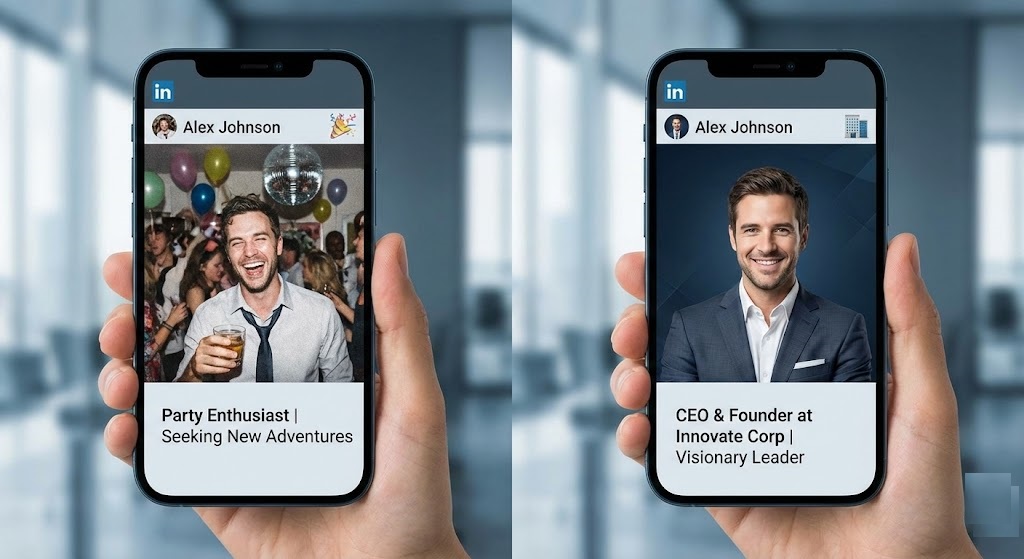
Your Photo is Your First Impression
Recruiters spend an average of 6 seconds looking at a resume. On LinkedIn, they spend even less time scrolling past your profile. If your photo is dark, blurry, or features a distracting background (like a beach or a crowded bar), they might keep scrolling.
According to LinkedIn’s own data, profiles with professional photos get 14x more views and 36x more messages. You don’t need a corporate photoshoot to look the part. You can transform a casual selfie into a CEO-level headshot using a LinkedIn profile picture background tool like rmvbg.net.
The “Context” Mistake
Many job seekers make the mistake of leaving “context” in their photos.
- The “Car Selfie”: The seatbelt is visible. It looks rushed.
- The “Wedding Crop”: You can see a disembodied hand on your shoulder from a group photo.
- The “Bedroom Wall”: A poster or messy shelf is visible behind you.
These backgrounds scream “amateur.” A recruiter wants to see you, not your life.
What is the Best Background Color?
Once you remove the messy background, what should you replace it with?
| Industry | Recommended Background | Vibe |
|---|---|---|
| Corporate / Law / Finance | Dark Grey / Navy Blue | Trust, Authority, Stability |
| Tech / Startup | Light Grey / White | Clean, Modern, Efficient |
| Creative / Marketing | Bright Solid Color (Yellow/Teal) | Energy, Personality, Innovation |
Step-by-Step: The DIY Headshot
Follow this workflow to upgrade your profile in 5 minutes.
Step 1: The Photo
Put on a blazer or a nice shirt. Stand facing a window for natural light. Take a photo against *any* wall. Smile comfortably.
Step 2: The Extraction
Upload the photo to rmvbg.net. Our AI will strip away the wall, the seatbelt, or the wedding guests. It creates a focused cutout of your head and shoulders.
Step 3: The Edit
Download the transparent PNG. Open it in a free editor (like Canva). Place your cutout on top of a colored square (e.g., #2C3E50 for a professional Navy Blue).
Pro Tip: Add a slight “vignette” (darker edges) to the background to draw focus to your face.
Should You Use a White Background?
While white is standard for ID cards, it can sometimes look “floating” on LinkedIn, because LinkedIn’s interface is already white/light grey. A colored background helps your circle stand out in the feed and catches the recruiter’s eye.
Conclusion
Don’t let a bad background cost you an interview.
Use rmvbg.net to take control of your personal brand. A clean, intentional LinkedIn profile picture background shows that you pay attention to detail—a quality every employer wants. Update your profile today.