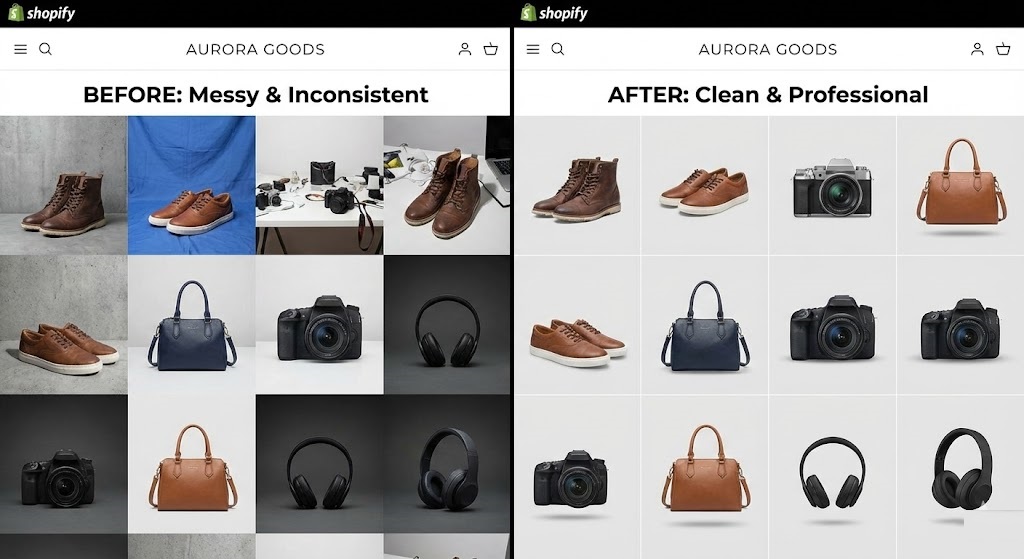
The “Frankenstein” Store Problem
You have launched your Shopify store. You sourced products from three different suppliers. One supplier takes photos on a white background. Another uses a grey background. The third uses a messy warehouse floor.
When you put them all together on your “Collection” page, your store looks like a flea market. It lacks cohesion. In e-commerce, inconsistency kills trust. If your images look scraped from the web, customers assume you are a scam or a low-quality dropshipper.
To build a brand that people trust, you need consistent Shopify product photography. You don’t need to ship all the products to your house and reshoot them. You can simply unify the backgrounds using rmvbg.net.
Why Uniformity Increases Conversion Rates
Look at top brands like Gymshark, Allbirds, or MVMT. What do they have in common? Every single product photo has the exact same background color and lighting style.
- Visual Flow: The customer’s eye scans the products easily without getting distracted by changing background colors.
- Brand Identity: A specific background color (like a soft pastel or a stark black) becomes part of your brand.
- Perceived Value: A consistent grid implies that you hold inventory and care about quality control.
The “AliExpress” Cleanup Workflow
If you are dropshipping, your supplier’s photos are likely cluttered with watermarks, Chinese text, or bad lighting. Here is how to fix them for free.
Step 1: Download the Source Image
Save the highest resolution image available from your supplier. (Right-click > Open Image in New Tab > Save As).
Step 2: Remove the Background
Upload the image to rmvbg.net. Our AI will strip away the warehouse floor, the ugly mannequin, or the grey backdrop. You are left with just the product.
Step 3: Choose Your Brand Background
Now, place every single product on the same background.
Option A (Clean): Pure White (#FFFFFF). Best for Google Shopping and general retail.
Option B (Premium): Light Grey (#F5F5F5). Adds a subtle contrast that makes white products pop.
Option C (Bold): A bright color that matches your logo. Great for Instagram ads.
Batch Processing for Collections
If you have 50 products, doing this manually in Photoshop would take days. With our tool, you can process images in seconds.
Once you have your transparent PNGs, you can use a free tool like Canva to create a “Product Template.” Just drag-and-drop your new transparent product into the template, save, and repeat. You will have a uniform collection page in under an hour.
Image Optimization for Page Speed
Shopify themes are sensitive to image size. Large, unoptimized images slow down your site, hurting your SEO.
When you download from rmvbg.net, you get a clean PNG.
Pro Tip: Before uploading to Shopify, convert your final image (with the new background) to WebP or JPG. This reduces the file size by up to 80% without losing quality, making your store load faster on mobile.
Conclusion
Don’t let your suppliers dictate your store’s look. Take control of your visual identity.
Use rmvbg.net to standardize your Shopify product photography. It is the fastest way to turn a “dropshipping site” into a “legitimate brand.” Start editing your collection today.