Your “Closet” is a Boutique. Treat It Like One.
You have sourced incredible vintage finds. Have written detailed descriptions. You have shared your listings to every Posh Party. But your items still aren’t selling.
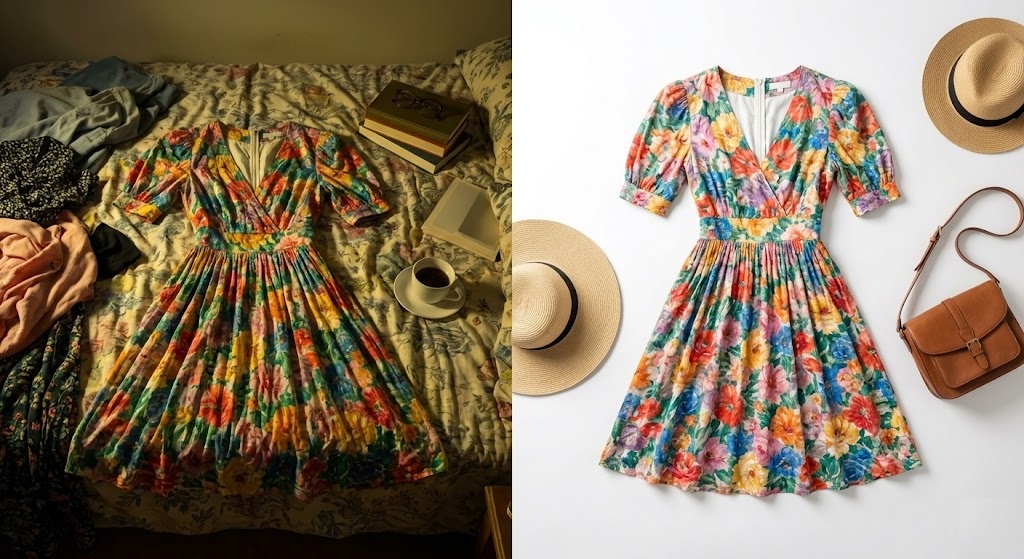
The problem is likely your photos. On apps like Poshmark, Depop, and Mercari, visual appeal is everything. A photo of a wrinkled shirt on a dark bedspread screams “used.” A photo of that same shirt on a clean, white background screams “curated vintage.”
You don’t need a professional photo studio to get that boutique look. You just need a reliable Poshmark background remover. With rmvbg.net, you can transform your messy bedroom photos into professional catalog images for free.
Why White Backgrounds Sell Clothes Faster
There is a reason nearly every major fashion retailer—from ASOS to Zara—uses white or neutral backgrounds. It reduces cognitive load for the buyer.
- Focus on the Item: A busy background (like a patterned rug) distracts the eye. The buyer might look at your rug instead of the dress.
- Color Accuracy: Yellow room lighting changes the color of fabric. By removing the background, you can often color-correct the item more easily.
- Perceived Value: A clean image suggests the item is clean and well-cared for. A messy room suggests the item might be dirty.
The “Flat Lay” Hack for Resellers
You don’t need a mannequin. The easiest way to photograph clothes is the “Flat Lay” method combined with our AI.
Step 1: The Setup
Lay your garment on the floor or a table. Smooth out the wrinkles. Stand directly over it (use a step stool if needed) to get a straight-down angle. Take the photo with your smartphone.
Step 2: The Magic Cleanup
Don’t worry if the floor is ugly or the lighting is uneven. Upload your photo to rmvbg.net. Our AI is trained on fashion items.
It creates a virtual clipping path around the fabric, preserving buttons, fringe, and lace details that other tools often cut off.
Step 3: The “Digital Studio”
Once you have the transparent PNG, you can get creative.
- Classic White: Place it on white for that professional e-commerce look.
- Brand Colors: Use a consistent pastel pink or beige background for all your listings to create a recognizable “brand aesthetic” for your Poshmark Closet.
- Shadows: Add a subtle drop shadow in Canva to make the item pop off the screen.
Poshmark vs. Depop vs. eBay
Each platform has a different vibe. Our tool helps you adapt to all of them from a single source photo.
| Platform | Preferred Style | Our Solution |
|---|---|---|
| Poshmark | Clean, Square (1:1), Bright | Square White Background |
| Depop | Edgy, Streetwear, Colored | Neon or Textured Background |
| eBay | Utilitarian, White Only | Pure White (Required) |
Save Money on “Cross-Listing”
If you use software like Vendoo or ListPerfectly to sell on multiple sites, having a clean source image is crucial. Some platforms (like Google Shopping via eBay) will actually reject your listing if the background is too cluttered.
By using rmvbg.net as your primary Poshmark background remover, you ensure your inventory is ready for any marketplace. You do the work once, and you sell everywhere.
Conclusion: Turn Your Phone into a Cash Machine
Reselling is a hustle. Don’t let bad photos slow down your sales. You don’t need to rent a studio or buy expensive lights.
Take 5 minutes today to update your oldest, stale listings with fresh, background-free images. You will be shocked at how quickly they sell. Start editing now with rmvbg.net.