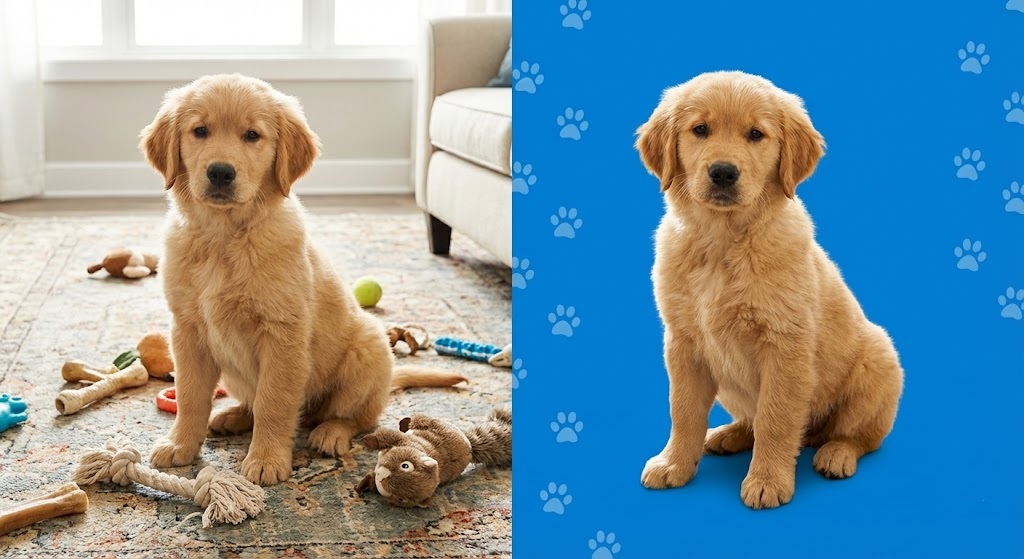
Turn Your Pet into an Instagram Star
We all do it. Our camera rolls are 90% photos of our dogs and cats. But capturing a studio-quality portrait of a moving animal is nearly impossible at home. The lighting is bad, the carpet is messy, or the cat decides to sit in front of a pile of laundry.
If you want to turn those casual snapshots into professional portraits, stickers, or custom merchandise, you need a specialized tool. You need to remove background from pet photo without losing the details that make your pet unique—like their whiskers or fluffy ears.
With rmvbg.net, you can isolate your pet from the chaos of your living room in seconds, completely free.
The Challenge: Fur vs. Algorithms
Animals are notoriously difficult for standard photo editors. Unlike a car or a box, animals have soft, fuzzy edges.
- Whiskers: These fine hairs are often semi-transparent and disappear against complex backgrounds.
- Fur Texture: A “hard” cutout makes a fluffy dog look like a cardboard cutout. You need to preserve the softness of the coat.
- Black Fur: Photography’s hardest subject. Black dogs and cats often lose definition in shadows, making it hard for AI to see where the dog ends and the shadow begins.
Our AI model has been trained on thousands of animal images to recognize these specific textures.
3 Fun Ways to Use Pet Cutouts
Once you have a transparent PNG of your pet, the creative possibilities are endless.
1. Custom “Face” Stickers
You have seen them on laptops and water bottles—a dog’s head with a white outline.
How to do it:
1. Upload a close-up of your pet’s face to rmvbg.net.
2. Download the transparent PNG.
3. Upload it to a printing service like Redbubble or StickerApp.
4. Stick your pet’s face on everything you own.
2. The “Royal General” Portrait
A popular trend is photoshopping a pet’s head onto the body of a Renaissance general or a king.
The Secret: It only works if the neck fur blends realistically. Our tool keeps the jagged edge of the neck fur, allowing you to blend it seamlessly over the costume layer in Photoshop or Canva.
3. Shelter & Adoption Profiles
If you foster animals, you know that better photos save lives. A dog photographed in a dark kennel cage looks sad and unapproachable.
By using a pet background remover, you can place that same dog on a bright, happy yellow background. This simple edit stops the scroll on social media and increases adoption inquiries significantly.
Tips for the Perfect Pet Photo
To get the best result from our AI, follow these shooting tips:
- Get on Their Level: Don’t shoot from standing up. Get down on your knees so the camera is at the animal’s eye level. This creates a connection with the viewer.
- Contrast Helps: If you have a black cat, try to photograph them against a light wall or blanket. If you have a white dog, find a dark background. This helps the AI define the edges.
- Treats are Key: Hold a treat directly above the camera lens. This ensures the pet looks up with bright, alert eyes.
Step-by-Step Guide
- Snap the Pic: Take a photo of your pet sitting still (good luck!).
- Upload to AI: Drag the file into rmvbg.net.
- Check the Edges: Look closely at the ears and tail. Our tool usually nails it on the first try.
- Download: Save the HD image.
Why “Free” Matters for Shelters
Adoption agencies operate on shoestring budgets. They cannot afford professional retouching for every animal that comes through the door. Studies show that high-quality images drastically reduce the time an animal spends in a shelter.
rmvbg.net is free for everyone. Whether you are a dedicated rescuer or just a proud dog mom, you have access to the same powerful technology.
Conclusion
Your pet deserves to look their best. Don’t let a pile of laundry in the background ruin a cute moment.
Use rmvbg.net to remove background from pet photo instantly. It is the easiest way to celebrate your furry friend and create memories (or merchandise) that last forever.