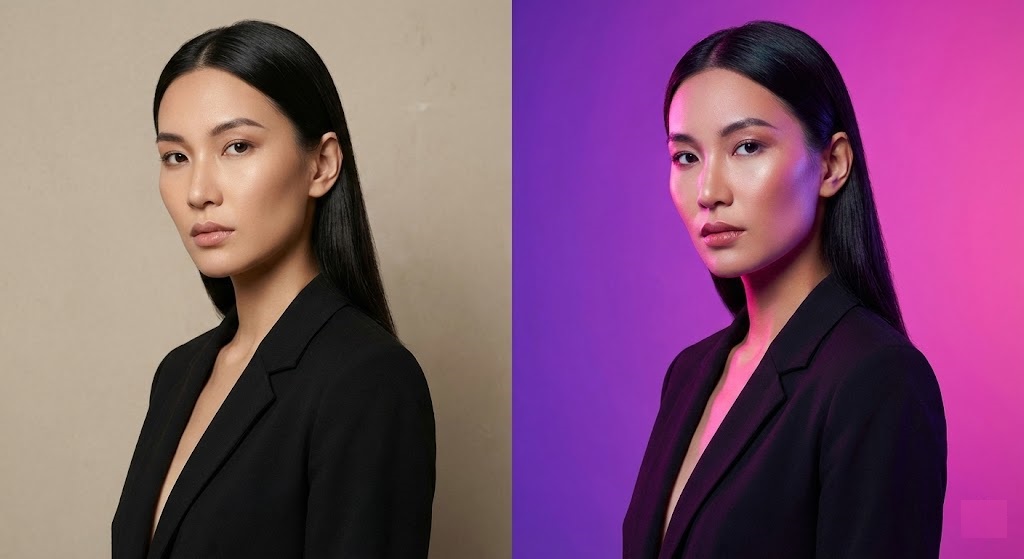
Don’t Let a Boring Background Ruin a Great Photo
You took a perfect selfie. The lighting is great, your smile is genuine, and your outfit looks sharp. But there is one problem: you are standing in front of a messy kitchen, a dull beige wall, or a crowded street.
The background sets the mood of the entire image. A grey background says “professional.” A neon pink background says “creative.” A cluttered background says “unorganized.”
You don’t need to reshoot the photo. You can simply change photo background color to match your vibe using rmvbg.net. It is the fastest way to upgrade your personal brand for free.
The Psychology of Background Colors
Color isn’t just decoration; it is communication. Before you choose a new background, consider what message you want to send. According to color psychology experts, different hues evoke different emotions:
| Color | Emotion / Vibe | Best For |
|---|---|---|
| Blue / Navy | Trust, Stability, Professionalism | LinkedIn, Corporate Headshots |
| White / Grey | Clean, Minimalist, Neutral | ID Photos, Resumes, Product Listings |
| Yellow / Orange | Energy, Optimism, Fun | Instagram, YouTube Thumbnails |
| Black | Luxury, Elegance, Drama | Portfolio, Artistic Portraits |
Why Apps Often Fail
Many mobile apps claim to “replace background,” but they often look fake. They cut out your hair harshly, leaving a jagged line that makes you look like a cardboard cutout.
To make a color change look realistic, you need edge blending. Our AI doesn’t just cut; it refines the semi-transparent pixels around your hair and clothes. When you place your cutout on a new color, these pixels blend naturally, creating a seamless composite.
Step-by-Step: From Drab to Fab
Ready to experiment? Follow this 3-step workflow.
Step 1: Isolate the Subject
Upload your photo to rmvbg.net. Our tool will automatically identify the person (or object) and remove the original environment.
Tip: This works best if the subject is in focus. Blurry photos are harder for AI to separate.
Step 2: Download the Transparent Asset
Save the HD PNG file. This is your “sticker.” You can now place this sticker on literally anything.
Step 3: Add the New Color
You can use any free editor for this part (Canva, Instagram Stories, or Photoshop Express).
- Open a blank canvas in your desired color (e.g., #000000 for black).
- Import your transparent PNG from rmvbg.net.
- Center it.
- Save!
Creative Hack: The “Gradient” Look
Solid colors are great, but gradients are trending in 2026. A subtle shift from light blue to dark blue can look like professional studio lighting.
How to do it: Instead of a solid color, search for “Gradient Background” on a free stock site like Unsplash. Use that image as your base layer. It adds depth and dimension that a flat color cannot achieve.
Conclusion
Your environment shouldn’t limit your creativity. Just because you took a photo in your bedroom doesn’t mean it has to look like you are in your bedroom.
Use rmvbg.net to take control of your image. Whether you need a crisp white for a passport or a moody blue for a dating profile, the power to change photo background color is now in your pocket.